Thursday, 10 March 2011
FileNote ER5 for Psion 1.02
... another quick update - FileNote ER5 v. 102:
- Changed menu item “MBM view” to “Picture view” to better suit new features - displaying, besides MBM picture files, Sketch and AIF files (improved).
- Added option to view EPOC Word files (menu item “Text view”) and improved viewing OPL source files.
- Added 2 FileNote macros - Qmpiler (decompiles OPL compiled files - APP, OPO, etc) and Compactor (compacts various data files).
- few minor bug fixes.
Download from original announcement post.
Wednesday, 9 March 2011
FileNote ER5 for Psion updated
Monday, 24 January 2011
Spotlight for EPOC
Spotlight is an Offline Search Tool which enables you to get the
files stored in Spotlight Index, instantly, as you type a query string.
There are 2 basic Spotlight window sections:
1) Query (Edit) box, where you type a search string, and
2) Files box where you browse the found files.
Go from Query box to Files box by using "Down" key.
Go back to query box using Ctrl+L, if you want to keep the results visible, or by using ESC you close the Files box. Second ESC will send Spotlight to background. Set Global hotkey so you can easily bring Spotlight forth and back.
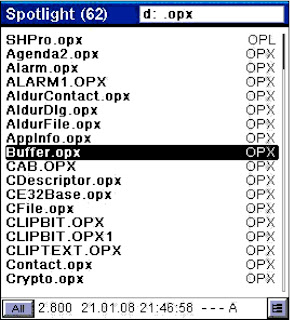
In Query box you can edit string, select all (Ctrl+A), copy, paste, insert special char (Shift+Ctrl+C), etc...
In Files box you can manage selected file. Ctrl+G will jump to folder in System screen where the selected file is placed. Using SPACE you can Quick View various file types:
Text, OPL source, compiled OPL (OPO, APP, OPM,...), Epoc Word, MBM, AIF, Sketch and ZIP/PAC archives. Additionaly, you can get Hex view (Ctrl+H) of any file.
There are 2 basic search modes:
1) "Exclusive" - get only files which contain the search string.
2) "Inclusive" - get also files in folders whose path contains the search string.
"Inclusive" mode is automatically set when query string contains "\" or ":" sign.
Wildcards ("*","?") are allowed and for easier typing you can use SPACE instead of asterisk ("*"), like this: "opl test" instead of "opl*test".
Spotlight is extremely fast, due to special search engine, so you can safely set instant search to 1 char in "Settings", although 3-4 chars is more reasonable. It will usually take only few seconds to update Index with about 7-8 thousand files.
The idea and initial concept of this application came from my friend OSG, who, being too busy himself, pushed me brutally into another OPL adventure ;-)
Announced on: PsionWelt (German), PDAtotaal (Dutch), MyPsion (Russian)
Download Spotlight_v. 1.00
files stored in Spotlight Index, instantly, as you type a query string.
There are 2 basic Spotlight window sections:
1) Query (Edit) box, where you type a search string, and
2) Files box where you browse the found files.
Go from Query box to Files box by using "Down" key.
Go back to query box using Ctrl+L, if you want to keep the results visible, or by using ESC you close the Files box. Second ESC will send Spotlight to background. Set Global hotkey so you can easily bring Spotlight forth and back.

In Query box you can edit string, select all (Ctrl+A), copy, paste, insert special char (Shift+Ctrl+C), etc...
In Files box you can manage selected file. Ctrl+G will jump to folder in System screen where the selected file is placed. Using SPACE you can Quick View various file types:
Text, OPL source, compiled OPL (OPO, APP, OPM,...), Epoc Word, MBM, AIF, Sketch and ZIP/PAC archives. Additionaly, you can get Hex view (Ctrl+H) of any file.
There are 2 basic search modes:
1) "Exclusive" - get only files which contain the search string.
2) "Inclusive" - get also files in folders whose path contains the search string.
"Inclusive" mode is automatically set when query string contains "\" or ":" sign.
Wildcards ("*","?") are allowed and for easier typing you can use SPACE instead of asterisk ("*"), like this: "opl test" instead of "opl*test".
Spotlight is extremely fast, due to special search engine, so you can safely set instant search to 1 char in "Settings", although 3-4 chars is more reasonable. It will usually take only few seconds to update Index with about 7-8 thousand files.
The idea and initial concept of this application came from my friend OSG, who, being too busy himself, pushed me brutally into another OPL adventure ;-)
Announced on: PsionWelt (German), PDAtotaal (Dutch), MyPsion (Russian)
Download Spotlight_v. 1.00
Sunday, 21 February 2010
In Development... (Abandoned)
Mac OSX users must be surely familiar with famous notes store and retrieve application, Notational Velocity.
It is an attempt to loosen the mental blockages to recording information and to scrape away the tartar of convention that handicaps its retrieval. The solution is by nature nonconformist.The concept is simple, yet powerful and handy:
Have a peep into its EPOC incarnation:
Friday, 29 January 2010
FileNote S80 v. 2.15 released
FileNote S80 for Nokia Communicator released in ver. 2.15.
1) MBM files extracted/saved in FileNote can be viewed in built-in Image Viewer.
2) Added bonus: AIF files (app icon) can now be viewed in MBM Viewer (Ctrl+M). Only AIF files that belong to OPL written applications are handled (and some of C++ origin). Only first bitmap shown.
1) MBM files extracted/saved in FileNote can be viewed in built-in Image Viewer.
2) Added bonus: AIF files (app icon) can now be viewed in MBM Viewer (Ctrl+M). Only AIF files that belong to OPL written applications are handled (and some of C++ origin). Only first bitmap shown.
Monday, 25 January 2010
Zip (archiving) macro?
Let's see if there could be any interest for a fast and straightforward macro (for Psion). It could pack a selected file or whole folder in System screen to ZIP archive without hassle or, if the ZIP archive is selected, it could just unpack it to the current folder.
If enough votes (just post a comment here), let say 20, is gathered I promise to publish the macro within 24 hours :-)
wOpen macro for ER5 (Psion) - 1.01 released
Improved wOpen macro version 1.01 can be downloaded from the original post.
1) Macro couldn't run on the Revo. Note that this version is fixed to run only on english language Revo. I could fix it to run on other language Revo at request (mail me).
2) Macro hotkey (keystroke) works only from the System screen and if any other app is foregrounded it will not be affected. The related keystroke will be just passed over to the foregrounded application. This macro feature is the first time ever AFAIK.
Thanks to my friend OSG for letting me know about these problems. Dedicated to you Jan :-)
EDIT (27 Jan): Fixed passing macro keystroke to foregrounded app (if macro called from there and not from System screen) in case that Assistant macro application is used.
1) Macro couldn't run on the Revo. Note that this version is fixed to run only on english language Revo. I could fix it to run on other language Revo at request (mail me).
2) Macro hotkey (keystroke) works only from the System screen and if any other app is foregrounded it will not be affected. The related keystroke will be just passed over to the foregrounded application. This macro feature is the first time ever AFAIK.
Thanks to my friend OSG for letting me know about these problems. Dedicated to you Jan :-)
EDIT (27 Jan): Fixed passing macro keystroke to foregrounded app (if macro called from there and not from System screen) in case that Assistant macro application is used.
Friday, 22 January 2010
Files Integrity Verifier for ER5 (Psion)
This application enables a comprehensive report of disk (files) changes by creating a md5 snapshot of the selected folder or the whole disk.
The Verifier is a standalone module stripped out from the View+ application and is specially designed to fit smaller Psion screens like 5mx and Revo. The review (by Leo) in Epoc word format is included.

Save File: Verifier_100.zip
The Verifier is a standalone module stripped out from the View+ application and is specially designed to fit smaller Psion screens like 5mx and Revo. The review (by Leo) in Epoc word format is included.

Save File: Verifier_100.zip
Saturday, 2 January 2010
wOpen macro for ER5 (Psion)
Yet another simple and fast openwith macro for ER5 (Psion) machines. It should be used with Macro5 or Assistant macro programs.
Install it in your Macros folder and assign a hotkey. It will pop up a window with the list of programs to run a file selected in System screen. Assigning programs to file extensions is easy. It can be done when you first time run a macro on a file and also from the macro setup window. The advantage of this macro is that you can assign several programs to the same file extension. Additionally you can change the assigned macro hotkey directly from the macro setup window without opening the macro program itself. In any macro window use the Menu key to get the menu options.
Macro Setup window can be reached from the openwith dialog or by running the macro file directly (not as a macro). Setup dialog will be also opened if no program is assigned to the selected file extension.
If selected file in system screen does not have an extension the user will be offered to select from the list of all installed programs to run with.
View more screenshots here.
Save File: wOpen_macro.zip
Install it in your Macros folder and assign a hotkey. It will pop up a window with the list of programs to run a file selected in System screen. Assigning programs to file extensions is easy. It can be done when you first time run a macro on a file and also from the macro setup window. The advantage of this macro is that you can assign several programs to the same file extension. Additionally you can change the assigned macro hotkey directly from the macro setup window without opening the macro program itself. In any macro window use the Menu key to get the menu options.
Macro Setup window can be reached from the openwith dialog or by running the macro file directly (not as a macro). Setup dialog will be also opened if no program is assigned to the selected file extension.
If selected file in system screen does not have an extension the user will be offered to select from the list of all installed programs to run with.
View more screenshots here.
Save File: wOpen_macro.zip
Monday, 28 December 2009
AIF Builder ER5 (Psion)
This is a fully functional standalone module from View+ application (EPOC32 ER5 Psion).
It is the unique Psion util that enables you to create from the scratch the icon (AIF) file for any installed application, in case you lost the original icon or if you just want to replace it with any other icon of your liking. You can set the caption name, set if the icon will be visible from the "Extras" and also if the application will support the creation of new files. The only thing you need is your own created or chosen MBM file as a source.
The use of AIF Builder is pretty straightforward and could be seen from the next two screenshots.


Save File: Aif_Builder_ER5.zip
It is the unique Psion util that enables you to create from the scratch the icon (AIF) file for any installed application, in case you lost the original icon or if you just want to replace it with any other icon of your liking. You can set the caption name, set if the icon will be visible from the "Extras" and also if the application will support the creation of new files. The only thing you need is your own created or chosen MBM file as a source.
The use of AIF Builder is pretty straightforward and could be seen from the next two screenshots.
Save File: Aif_Builder_ER5.zip
Friday, 25 December 2009
Full power to Macro5
Macro5 & EPOC OPL aficionados have a look here...
Unveiling for the first time the several useful functions (16 in all) that were hidden from the Macro5 users (contained in Macro5.opx). Written back in 2005, this small library, called Macro5+.mcx, enables you to access new exciting Macro5 features. Enjoy it ...
Кусайте локти, предатели ЗЫШЩТта! ;-))
Save File: Macro5+.zip
Unveiling for the first time the several useful functions (16 in all) that were hidden from the Macro5 users (contained in Macro5.opx). Written back in 2005, this small library, called Macro5+.mcx, enables you to access new exciting Macro5 features. Enjoy it ...
Кусайте локти, предатели ЗЫШЩТта! ;-))
Save File: Macro5+.zip
Wednesday, 23 December 2009
Sunday, 20 December 2009

As if I knew that my frozen friends (ciao, Thomas) would complain about the weather I took a photo while going to have my coffee this morning.
EPOC Image Extractor

This util will extract raw images from the following EPOC files: Agenda, Jotter, Data and Word. It is not perfect but most of time fine results will be achieved. Specific compressed images could give a bit distorted output. The images can be extracted either as Epoc picture (MBM) or Sketch images.
Thanks a lot to my friend OSG for the idea and thorough testing.
Save File: EPOC_Image_Extractor_100.zip
View+ for Psion netBook v. 2.18 RC2
i. Added an option to remove (delete) files from zip archives.
ii. EpocSfx archive (PAC) files are fully supported (equal to ZIP archives).
When creating archive just put PAC extension instead of ZIP.
Converting ZIP to PAC and vice versa is done by simple renaming (changing extension).
Now you also get a very useful use of batch creating multiple PAC files (using Ctrl+Shift+Z) and also batch unzipping PAC files (Shift+U). Of course, you first have to select multiple archives (files).
Download from View+ forum
Announced on PsionWelt
Thursday, 17 December 2009
FileNote ER5 (Psion)

"Yes, it is true! One of the best applications ever written for Nokia 9300/9500 was ported to Psion ER5 machines. Edo was working hard to bring FileNote to our beloved Psion machines. I am hounoured to host this cool application on my site. Get it, it's a must for every psion enthusiast."
Omega Software Graphics
PsionWelt announcement
Save File: FileNote_ER5_1.02.zip
Sunday, 28 December 2008
CronTab S80 1.02
=============================
21.12.08
CronTabS80 ver. 1.02 Build 01
for Nokia Communicator 9210(i), 9300(i) and 9500
(C)Copyright Edo
edo.vucurovic@st.htnet.hr
http://tech.groups.yahoo.com/group/FileNote/
=============================
Martin O'Neill:
CronTab S80 by OPL maestro Edo is a combination of the in-built Clock and CronTab for EPOC, on steroids. It is an incredibly flexible task scheduling program which can:
21.12.08
CronTabS80 ver. 1.02 Build 01
for Nokia Communicator 9210(i), 9300(i) and 9500
(C)Copyright Edo
edo.vucurovic@st.htnet.hr
http://tech.groups.yahoo.com/group/FileNote/
=============================
Martin O'Neill:
CronTab S80 by OPL maestro Edo is a combination of the in-built Clock and CronTab for EPOC, on steroids. It is an incredibly flexible task scheduling program which can:
- sound a variety of alarms
- run programs and macros
- open documents or files
- send an SMS
- open the telephone application with a number to call

Download from FileNote for S80 (Nokia Communicator)
FileNote S80 2.14 Release
=============================
21.12.2008.
FileNote ver. 2.14 Release
Advanced File Manager with macros/plugins and file description capabilities - for Nokia Communicator 9210(i), 9300(i) and 9500
(C)Copyright Edo
edo.vucurovic@st.htnet.hr
http://tech.groups.yahoo.com/group/FileNote/
=============================
FIRST THINGS FIRST (if older version installed):
Close FileNote and copy new Macro library ("FNMAcro.lib") to \System\Opx\.
-----------------------------------------------------------------------------------
If your last installation is ver. 2.10 please run supplied updater file "FN_210to214_INI_Updater.opo" before installing Release version 2.14.
Your old INI files will be backuped.
1) Extract following files to C:\System\Apps\FileNote\ :
FileNote.app
FileNote.aif
2) Extract "FNMacro.lib" to either C:\System\OPX\ or to D:\System\Opx\.
3) If you want to create your own macros you can extract optionally:
"FNMacro.oph" to either C:\System\OPX\ or to D:\System\Opx\.
4) Start FileNote and a new \Plugins\ folder will be created automatically:
C:\System\Apps\FileNote\Plugins\
Extract all plugin files to this folder.
Now all plugins functions are available from the FileNote menus.
5) Optionally, extract .OPL and .OPO files to C:\System\Apps\FileNote\Macros\.
Macro files are accessible via Macros panel.
Dozens of other FileNote macros can be found on the FileNote group.
Read FileNote HELP file to get around the new features and learn about all changes.
Thanks Martin for updated help files which can be found on the Filenote Yahoo group in Files\Miscellaneous\ folder.
Please post to the group your comments and report errors.

Read great zul's review in mht format (originally published on i_Symbian).
Download (free registration required):
FileNote for S80 (Nokia Communicator)
21.12.2008.
FileNote ver. 2.14 Release
Advanced File Manager with macros/plugins and file description capabilities - for Nokia Communicator 9210(i), 9300(i) and 9500
(C)Copyright Edo
edo.vucurovic@st.htnet.hr
http://tech.groups.yahoo.com/group/FileNote/
=============================
FIRST THINGS FIRST (if older version installed):
Close FileNote and copy new Macro library ("FNMAcro.lib") to \System\Opx\.
-----------------------------------------------------------------------------------
If your last installation is ver. 2.10 please run supplied updater file "FN_210to214_INI_Updater.opo" before installing Release version 2.14.
Your old INI files will be backuped.
1) Extract following files to C:\System\Apps\FileNote\ :
FileNote.app
FileNote.aif
2) Extract "FNMacro.lib" to either C:\System\OPX\ or to D:\System\Opx\.
3) If you want to create your own macros you can extract optionally:
"FNMacro.oph" to either C:\System\OPX\ or to D:\System\Opx\.
4) Start FileNote and a new \Plugins\ folder will be created automatically:
C:\System\Apps\FileNote\Plugins\
Extract all plugin files to this folder.
Now all plugins functions are available from the FileNote menus.
5) Optionally, extract .OPL and .OPO files to C:\System\Apps\FileNote\Macros\.
Macro files are accessible via Macros panel.
Dozens of other FileNote macros can be found on the FileNote group.
Read FileNote HELP file to get around the new features and learn about all changes.
Thanks Martin for updated help files which can be found on the Filenote Yahoo group in Files\Miscellaneous\ folder.
Please post to the group your comments and report errors.

Read great zul's review in mht format (originally published on i_Symbian).
Download (free registration required):
FileNote for S80 (Nokia Communicator)
Saturday, 13 December 2008
EpocSFX Pro
Welcome to wonderful world of archives !!!
====================
Epoc SFX Pro v. 1.00 ©Edo
for ER5 (Psion)
Build 006 of 25.07.08
====================
This util takes use of the following OPX libraries:
Zipenx.opx by S. Chestopalov
AldurFile / AldurDlg by G. Holden
nDirNav by Neuon
These libraries must be installed prior to running EpocSFX first time.
Archives with “.sfx” extension are self-extracting archives. If “Embed Zipenx” option is used the archive can be extracted on “clean” machine (after hard reset) - no OPX libraries required.
SFX archive can be self-extracted later by simply running it. You can transfer it to any other Psion device and run it there.
Archives with “.pac” extension are self-opening archives. When a packed document is opened from System it is first extracted and then opened with default program and, once the document has been closed, any changes are saved and repacked.
PAC archive is compatible with RMRZip and can be opened from RMRZip or renamed with “.ZIP” extension and run directly from System.
All EpocSFX handled archives (Sfx, Pac and Zip) can be converted to each other.
You can navigate the different drives by pressing the Tab key.
USE:
First select files or folders to add them to archive. Press “Add” as much times as needed.
You can select multiple folders and files from different drives. If a folder is selected, all files in subfolders will be added.
When you finish adding the files press “Pack” to create the needed archive type. To pack single file/folder just press "Pack" (Ctrl+P).
Pressing Enter on the archive will popup a dialog with options. Press Enter on any other file to open it with default program.
From the “Pack” dialog you can cancel (Cancel) the whole process and the previously added files will be dismissed.
Thanks to VKV brothers, OSG and JSH, for support, exhaustive testing and many inspiring ideas. Eventual errors and bugs are solely mine.
Download:
EpocSfx Pro v.100
Read review of the previous version on PsionWelt.
====================
Epoc SFX Pro v. 1.00 ©Edo
for ER5 (Psion)
Build 006 of 25.07.08
====================
This util takes use of the following OPX libraries:
Zipenx.opx by S. Chestopalov
AldurFile / AldurDlg by G. Holden
nDirNav by Neuon
These libraries must be installed prior to running EpocSFX first time.
Archives with “.sfx” extension are self-extracting archives. If “Embed Zipenx” option is used the archive can be extracted on “clean” machine (after hard reset) - no OPX libraries required.
SFX archive can be self-extracted later by simply running it. You can transfer it to any other Psion device and run it there.
Archives with “.pac” extension are self-opening archives. When a packed document is opened from System it is first extracted and then opened with default program and, once the document has been closed, any changes are saved and repacked.
PAC archive is compatible with RMRZip and can be opened from RMRZip or renamed with “.ZIP” extension and run directly from System.
All EpocSFX handled archives (Sfx, Pac and Zip) can be converted to each other.
You can navigate the different drives by pressing the Tab key.
USE:
First select files or folders to add them to archive. Press “Add” as much times as needed.
You can select multiple folders and files from different drives. If a folder is selected, all files in subfolders will be added.
When you finish adding the files press “Pack” to create the needed archive type. To pack single file/folder just press "Pack" (Ctrl+P).
Pressing Enter on the archive will popup a dialog with options. Press Enter on any other file to open it with default program.
From the “Pack” dialog you can cancel (Cancel) the whole process and the previously added files will be dismissed.
Thanks to VKV brothers, OSG and JSH, for support, exhaustive testing and many inspiring ideas. Eventual errors and bugs are solely mine.
Download:
EpocSfx Pro v.100
Read review of the previous version on PsionWelt.
Sunday, 18 May 2008
Subscribe to:
Posts (Atom)


